
Transcripts
Discord ticket transcripts you can search, share and reopen
When a ticket closes, SUPREO archives the whole conversation: the messages, the attachments, the internal notes, who opened and closed it, how long it took and how the member rated it. Your team finds any of it again from the dashboard; members find their own tickets on theirs.
Transcripts are on every plan. Free servers see the last 7 days; Premium keeps the whole history in view.
How it works
- 1
A ticket closes
The conversation is archived with its files and notes, its staff and its timings.
- 2
It lands in Ticket History
One row per ticket: member, subject, staff, rating, when it closed and how long it stayed open.
- 3
Read, share or reopen
Open the transcript, download it as an HTML file, or reopen the ticket in a new channel.
More than a log file
Files that do not expire
Attachments are archived by SUPREO, so they outlive Discord's expiring links.
Search by member or staff
Find the tickets a person opened and the ones they handled — claimed, closed, answered or noted.
HTML, with or without notes
Download a standalone transcript to keep or forward. The version with internal notes is offered to staff only.
Reopen in one click
A new channel opens with the old conversation as its first card, and the member is told by DM.
Read-only reviewers
Give a lead a dashboard that shows history and transcripts and nothing else.
The member's own view
My tickets lists every ticket a member opened on any server using SUPREO, with the transcript of closed ones — never the notes.
Free and Premium
Free
- Every closed ticket archived, with files, notes and rating
- The last 7 days in Ticket History
- Transcript view, HTML download and reopen
- CSV export of the list
Premium
- The whole history, for as long as the server uses SUPREO
- Search by member or staff, and any period
- Log viewer roles with read-only access
- Webhook logging of opened and closed tickets
Learn more
Questions about transcripts
How long are transcripts kept?
For as long as the server uses SUPREO. The plan changes how much you are shown — the last 7 days on Free — not how much is stored, so upgrading brings the older tickets back into view.
Do attachments survive?
Yes. SUPREO archives the files, so a transcript still shows them after Discord's own links have expired.
Can members read their transcript?
Yes, on their My tickets page, for the tickets they opened or were added to. Internal notes are never shown to them.
Can I turn archiving off?
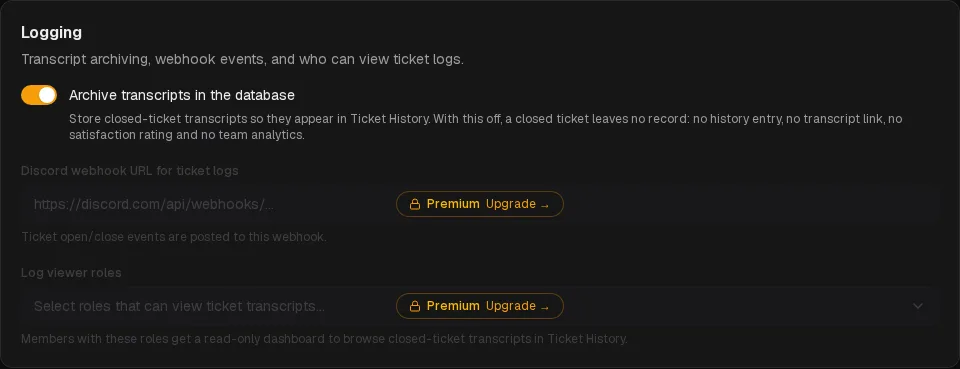
Yes, in Ticket setup → Logging. A closed ticket then leaves nothing behind: no history, no transcript, no rating and no analytics.
Can I export transcripts?
Each transcript downloads as a standalone HTML file, and the history list exports to CSV.
Keep every conversation
Add the bot, sign in with Discord, and every ticket you close is archived from the first one.