
Modmail
A Discord modmail bot your staff can actually work in
Members send your bot a direct message. The conversation lands in a private staff channel — on your server or on a separate support server — and every reply goes back to their DMs. Members never see a channel; your team gets canned responses, internal notes, ratings and a full transcript.
Part of Premium, with the Whitelabel add-on: members message your own bot.
How it works
- 1
A member messages your bot
Their first message becomes the subject. The bot answers with your categories, and once they pick one the ticket exists.
- 2
Your staff get a private channel
On your server, or on a support server your community never joins. Every later message from the member lands there.
- 3
Replies go back to their DMs
With the Reply button, a command, a canned response or the dashboard. Plain messages in the channel stay between staff.
Built for a support team
A separate staff server
Keep every ticket channel on a support server. Your main server never shows a ticket, and its settings stay on the main server.
Canned responses
Send an approved answer from the dropdown on the ticket card or with a command, the same wording every time.
Internal notes, by design
Anything typed in the channel without Reply is a note between staff: recorded in the transcript, never sent to the member.
Replies that look like you
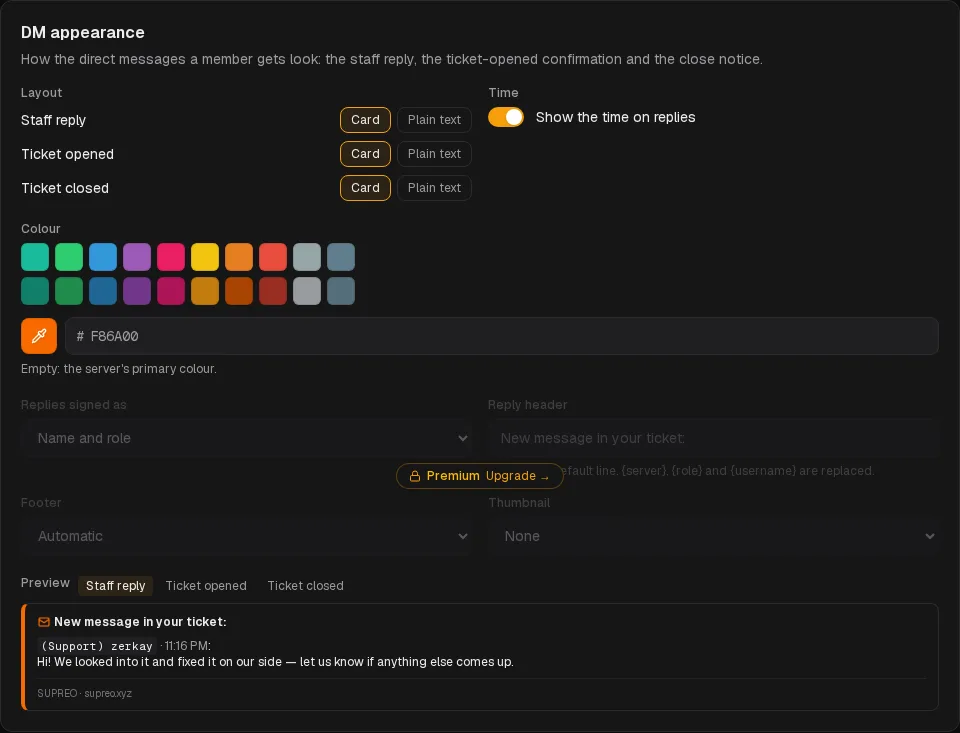
Card or plain text, your colour, and a signature by name and role, name, role, or simply the team.
Files both ways
Members send screenshots and files from their DMs; staff can attach a file to a reply.
Ratings and transcripts
On close the member gets the close message and, if you want, a 1–5 star rating. The whole conversation is archived.
What it needs
On every plan
- Ticket panels with categories, forms and claiming
- Canned responses and internal notes
- Transcripts and satisfaction ratings
- DM appearance: card or plain text, your colour, the time
Modmail itself
- Premium for the server
- The Whitelabel add-on: your own bot, name and avatar, with the Message Content intent
- A support server and DM ticket staff roles, if you want them
- Reply identity, header and footer in DM appearance
Set it up
Questions about modmail
Why does modmail need my own bot?
Members are messaging the bot directly, outside any server. The shared SUPREO bot is on many servers and cannot tell which one a DM is for; your own bot belongs to your server only. That is the Whitelabel add-on.
Can I use DM tickets and ticket panels together?
Yes. Panels keep working in your channels, and the DM ticket panel decides which categories are offered to members who message the bot.
Does the member see the staff channel?
No. They only ever talk to the bot in their DMs. With a support server, the channel is not even on a server they are in.
Can staff answer from a browser?
Yes. Replies sent from the dashboard conversation are relayed to the member's DMs, like the Reply button.
What if a member has their DMs closed?
The channel gets a delivery-failed notice, so staff know the reply did not arrive.
Give members a private way in
Add the bot, sign in with Discord, and turn on DM tickets once your own bot is running.