
DM appearance
How the direct messages a member gets look — the staff reply, the ticket-opened confirmation and the close notice — as a card or plain text, with your colour and signature.
Do this on my dashboardSUPREO sends a member three kinds of direct message: a staff reply (in DM tickets, or when a channel ticket relays replies by DM), the ticket opened confirmation, and the ticket closed notice. DM appearance, under Ticket setup, decides how each looks. The preview on the right shows all three with sample text as you change things.
Layout
Each of the three messages is either a card — a framed message with a colour strip, a title and an optional footer — or plain text, which reads like a person typing. Mix them: many servers keep the close notice as a card and send replies as plain text so the conversation feels human.
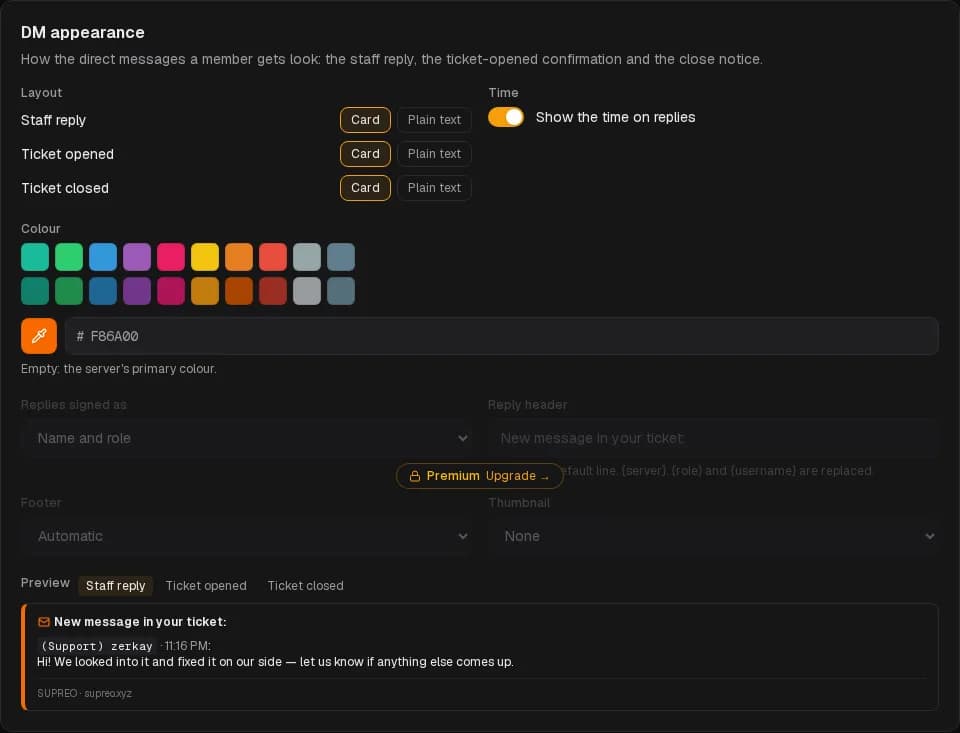
Colour and time
- Colour — the card's accent strip. Empty uses the server's primary colour from General settings.
- Show the time on replies — appends the time a reply was sent, in the member's own timezone.
Premium
Identity
Who a reply says it is from:
| Option | The member sees |
|---|---|
| Name and role | (Support) Alex |
| Name only | Alex |
| Role only | Support |
| Anonymous | Support team |
The role is the highest role of the staff member who replied. Anonymous is the choice for moderation teams that do not want individual names in DMs.
Header
The line above a reply. Empty is the default, New message in your ticket:. {server}, {role} and {username} are replaced — {username} is the staff member's name.
Footer
- Automatic — the bot's name.
- None.
- Custom text — your own line, such as Reply here to answer.
Thumbnail
The small image in a card's corner: none, the bot's avatar, the server icon or a custom image.
Free plan
Free servers choose the layout of each message, the colour and the timestamp. Replies are signed Name and role with the default header, and cards carry the SUPREO signature.
DM tickets
Let members open a ticket by messaging the bot. The conversation is relayed into a private staff channel — in your server or a separate support server.
History & transcripts
Every closed ticket, its transcript and rating — searchable, exportable, reopenable — and the member's own view of their tickets.