
General settings
The bot's language on this server, the colours of its cards, and the canned responses.
Do this on my dashboardGeneral (sidebar → Dashboard) holds the settings that are neither about tickets nor about a specific feature.
Bot language
The language of every built-in bot message on this server — prompts, buttons, DMs, panels made from templates. English, French, Spanish, Italian, Portuguese (Brazil) and German. Your own texts (custom messages, panel cards, canned responses) are always sent as you wrote them.
Free on every plan.
The dashboard has its own language, per user, in the profile menu — it does not change what the bot says.
Card colours
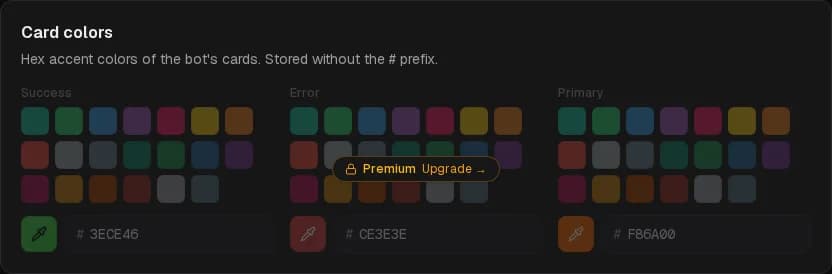
Three hex colours, without the #, used as the accent strip of the bot's cards:
- Primary — panels, ticket cards, DMs and most notices. Defaults to SUPREO's orange,
F86A00. - Success — confirmations.
- Error — refusals and failures.
A panel can override the primary colour with its own card colour, and DMs with the DM appearance colour.
Premium
Canned responses
Managed at the bottom of this page. See Canned responses.
Where the rest is
- Ticket options — messages, logging, DM tickets, support hours — are on Ticket setup.
- Role tiers are on Roles.
- The bot's status and activity are on Whitelabel bot.
Verification
New members prove they are human before they can talk — a button, a captcha inside Discord, or a web check with alt detection — and members who never pass can be removed.
Roles & access
Which Discord roles see ticket channels and use staff commands, who can open the dashboard, and who can only read.