
Honeypot
A bait channel your members are told never to write in. Spam bots post everywhere they can — their first message there gives them away, and SUPREO acts.
Do this on my dashboardSpam bots and hacked accounts post their link in every channel they can write to. A honeypot is an empty channel everyone can see and write in, with a clear warning not to. Real members read the warning and stay out; a bot does not read, posts, and is dealt with before the second message. Bots, the server owner, administrators and roles you exempt are never touched.
Set it up
Create the bait channel
Press Create it for me: SUPREO makes a #honeypot text channel everyone can see and write in, posts the warning notice, and sets it as the bait channel. The bot needs Manage Channels for this.
Or pick an existing empty channel nobody needs. Everyone must be able to see and write in it — that is what catches bots. Put it low in the channel list so members are not tempted, but do not hide it.
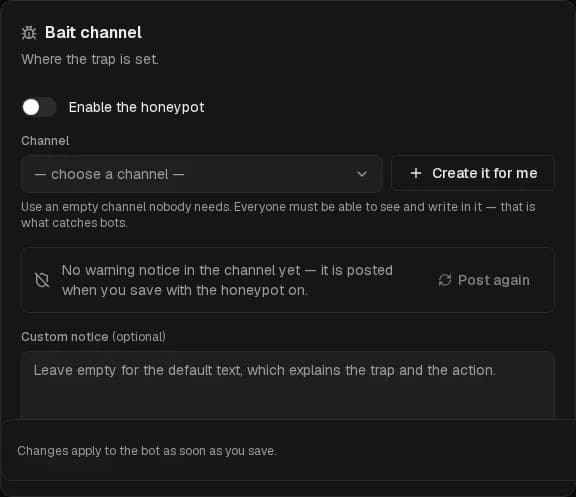
Choose the action
What happens to an account that posts there. The message itself is always deleted.
| Action | Effect | Bot needs |
|---|---|---|
| Softban (default) | Removes the account and wipes its messages from the last 24 hours. It can join again. | Ban Members |
| Ban | Bans the account and removes its recent messages. | Ban Members |
| Kick | Removes the account; it can join again. | Kick Members |
| Time out | Mutes the account for the timeout length you choose and keeps it in the server. | Moderate Members |
| Log only | Deletes the message and records the catch; the staff decides. | — |
The bot always needs Manage Messages to delete the bait message. The page lists what is missing.
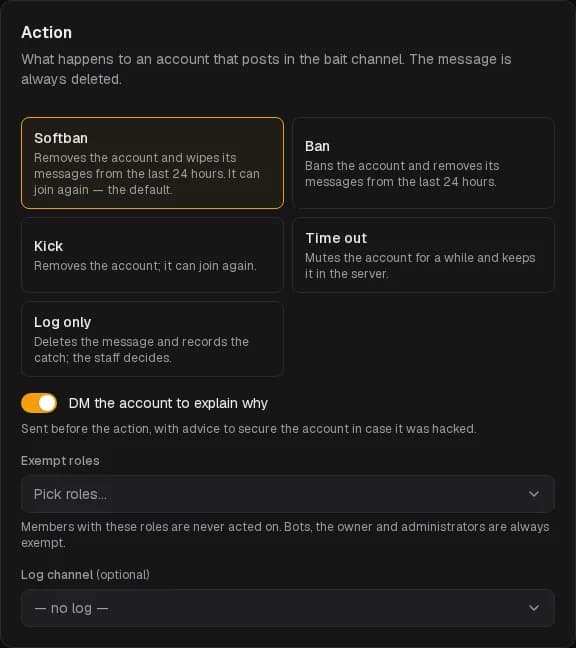
Fine-tune
- DM the account to explain why — sent before the action, with advice to secure the account in case it was hacked rather than a bot.
- Exempt roles — never acted on. Trusted members, other bots' roles.
- Log channel — every catch is posted there with the account, the message and the outcome.
- Custom notice — your own text on the red warning card in the channel. Keep it clear: whoever writes there gets the action.
Save
Enable the honeypot and save. The notice is posted if it is not there yet; Post again reposts it if it was deleted.
Recent catches
The bottom of the page lists the last accounts caught, kept for 90 days, with the action taken or the reason it failed.
Good to know
- A softban or ban takes the spam with it; a timeout keeps the account around so a human can look.
- With verification on, an account that writes in the trap before passing verification is a bot beyond doubt: it is banned whatever action you chose (unless the action is Log only). The log entry says so.
Welcome
Greet every new member with a card — a generated image with their avatar, a message, a button to your ticket panel — and give them roles on join.
Verification
New members prove they are human before they can talk — a button, a captcha inside Discord, or a web check with alt detection — and members who never pass can be removed.