
Welcome
Greet every new member with a card — a generated image with their avatar, a message, a button to your ticket panel — and give them roles on join.
Do this on my dashboardWelcome (sidebar → Community) posts a card in a channel of your choice each time someone joins: a welcome image drawn by the bot with the member's avatar and name, a message, and a button that takes them straight to support. It can also hand out roles the moment they arrive.
The bot needs to see joins
Welcome cards and auto roles rely on the Server Members intent. The shared SUPREO bot has it. For a Whitelabel bot, tick Server Members Intent in the Developer Portal under Bot → Privileged Gateway Intents, then restart it — the page tells you if it is missing.
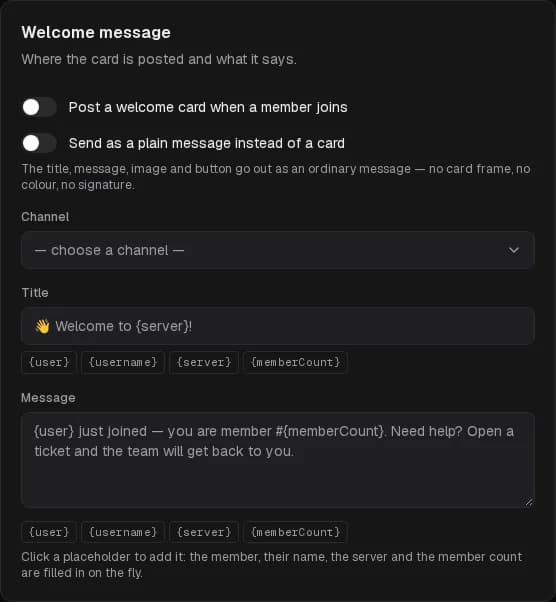
Welcome message
Turn it on and pick the channel
Post a welcome card when a member joins, then choose the channel. A #welcome channel members can read but not write in works best.
Write the title and message
Both accept placeholders, filled in for each arrival — click one to insert it:
| Placeholder | Becomes |
|---|---|
{user} | A mention of the member |
{username} | Their name |
{server} | The server name |
{memberCount} | The member count after they joined |
Default: 👋 Welcome to {server}! / {user} just joined — you are member #{memberCount}. Need help? Open a ticket and the team will get back to you.
Add the button
Button links to a channel — point it at the one your ticket panel is posted in — with a label such as Open a ticket. Leave the channel empty for no button.
Check the preview and send yourself a test
The Preview renders the image with your own avatar. Send me a test by DM delivers the whole card to you, exactly as a member would get it. Then Save.
Send as a plain message instead of a card drops the frame, the colour and the signature: title, message, image and button go out as an ordinary message.
Welcome image
Include the image adds a banner generated for each member. Two layouts are free:
- Centered — avatar on top, text below.
- Sidebar — avatar on the left, text beside it.
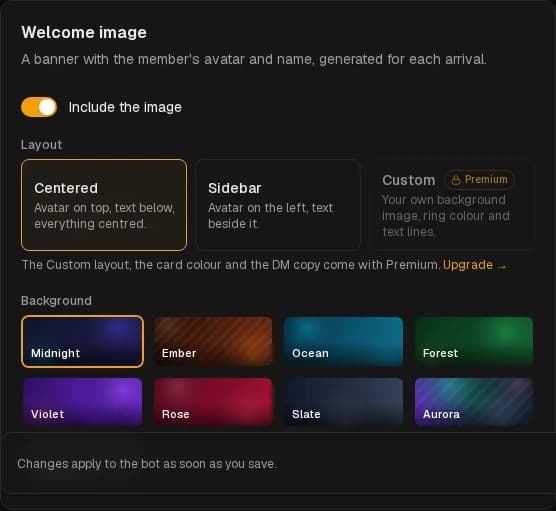
Custom (Premium) uses your own background image (an https PNG or JPEG, ideally 1024×420 or wider, or a built-in one), a ring colour around the avatar, a slider to darken the image so the text stays readable, and your own heading and line under the heading — with the same placeholders.
Card colour and DM copy
- Card accent — the colour strip of the card. (Premium)
- Also send the card to the member by DM — members whose DMs are closed simply do not get it. (Premium)
Auto roles
Roles given to every member the moment they join, with or without the card. Members going through Discord's membership screening get them once they accept the rules. One role on the free plan, up to five with Premium; Also give these roles to bots that join is separate.
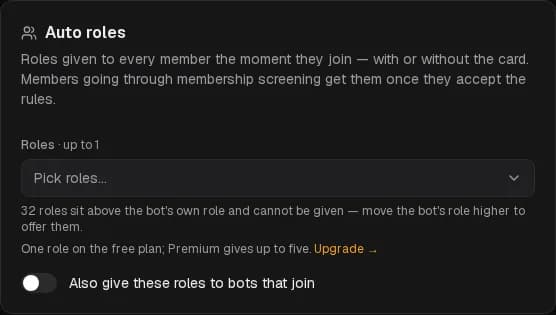
The bot can only give roles below its own in Server Settings → Roles. The page counts the roles it cannot reach and skips them until the bot's role is moved higher. It also needs Manage Roles.
It did not work?
History & transcripts
Every closed ticket, its transcript and rating — searchable, exportable, reopenable — and the member's own view of their tickets.
Server stats
Locked voice channels whose names show your server's numbers — members, boosts, open tickets — refreshed every ten minutes, and a member growth chart on the analytics page.